flashing controller firmware
storcli, drivers, firmware & psoc can all be downloaded from the broadcom support site.
your storcli, driver & firmware’s revision code (pxx number) should match - p37 in this example. the psoc version can & will differ.
example:
- storcli:
STORCLI_SAS3.5_P37.zip - driver:
ItSas35_Windows11_Windows_Server_2022_2025_P37.zip - firmware:
9500_16e_Pkg_P37_MIXED_FW_BIOS_UEFI.zip - psoc:
1.32_PSoC_Catalog_Firmware_HBA.zip
overview
upgrade storcli to newest version
just download the newest storcli for your hba. for the 9500 series this will be
storcli sas3.5. unzip & start using the newstorcli64.exe.upgrade hba driver to newest version and reboot
also not rocket science. open the driver zip file, extract the folder for your operating system,
Win11_25H2_x64in this case. open device manager, go to the hba & clickupdate driver. use the optionbrowse my computer for driversand select the folder you just unzipped.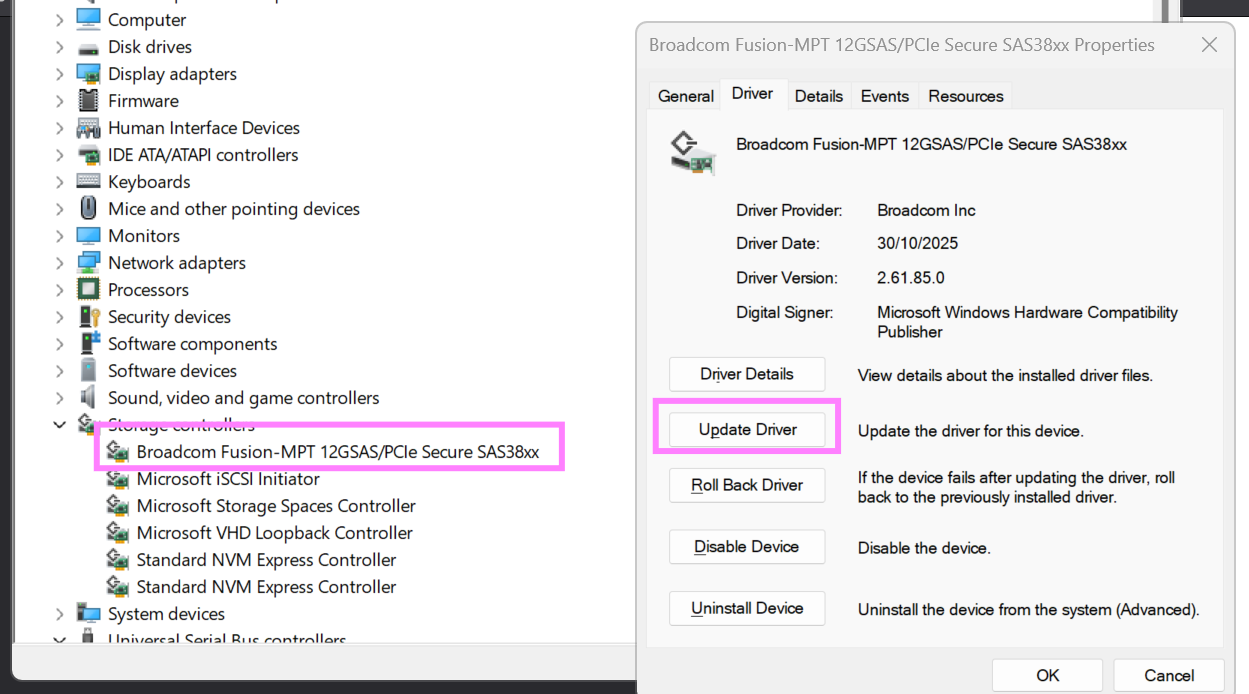
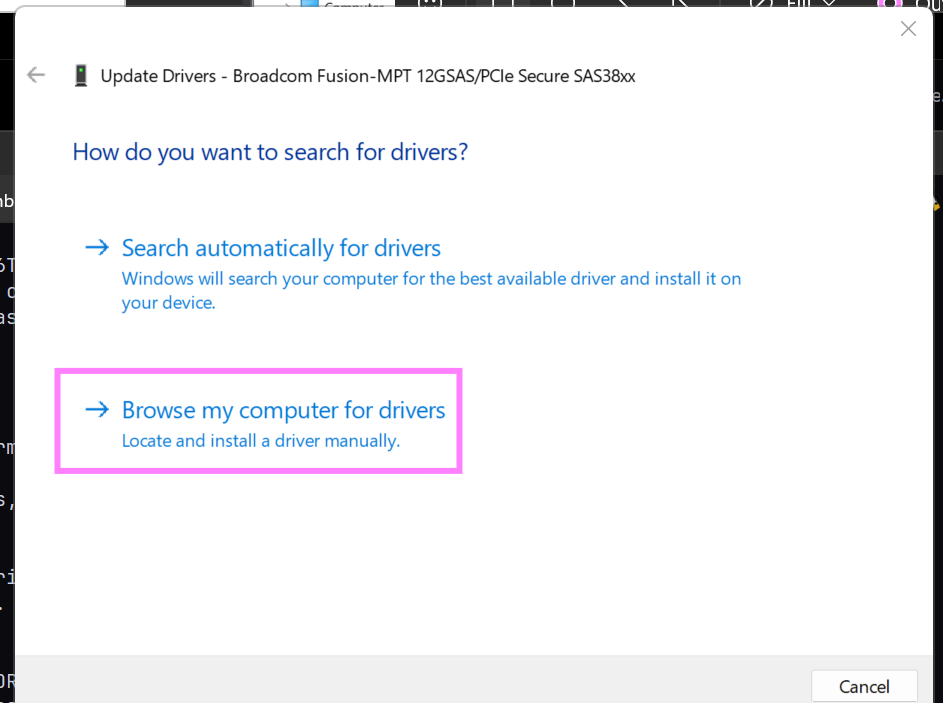
upgrade hba bios
the bios needs to be updated before the fw. you’ll find it in the firmware zip file in the
SAS35BIOS_UEFI_SAS3.5_IT_X64_ARMdirectory. make sure to use the one that saysx64 bios(ignore thearm uefione)storcli64.exe /c0 download bios file=IT_HBA_X64_BIOS_PKG_E6.romthis will take about 30 seconds to complete, your hba will continue work
upgrade hba fw
the firmware is can be found in the zip file under the
firmwaredirectory. there you’ll find bothHBA_9500-16e_SAS_SATA_Profile.binandHBA_9500-16e_Mixed_Profile.bin.storcli64.exe /c0 download file=HBA_9500-16e_SAS_SATA_Profile.binthis can will take a few minutes to complete. do not panic if the command appears frozen, just be patient.
upgrade psoc if available - todo
detailed walkthrough of the bios and fw part
detailed output from an p36 -> p37 upgrade
starting situation
storcli64.exe /c0 show
CLI Version = 007.3603.0000.0000 Oct 30, 2025
Operating system = Windows 11
Controller = 0
Status = Success
Description = None

Product Name = HBA 9500-16e
Serial Number = SPE4909773
SAS Address =  500062b2205fea80
PCI Address = 00:04:00:00
System Time = 02/16/2026 23:46:20
FW Package Build = 36.00.00.00
FW Version = 36.00.00.00
BIOS Version = 09.71.00.00_36.00.00.00
NVDATA Version = 36.00.00.14
PSOC FW Version = 0x006E
PSOC Part Number = 14790
Driver Name = ItSas35
Driver Version = 2.61.85.00
Bus Number = 4
Device Number = 0
Function Number = 0
Domain ID = 0
Vendor Id = 0x1000
Device Id = 0xE6
SubVendor Id = 0x1000
SubDevice Id = 0x4070
Board Name = HBA 9500-16e
Board Assembly = 03-50075-00003
Board Tracer Number = SPE4909773
Security Protocol = None
Package Stamp Mismatch = No
Physical Drives = 1
flashing the bios
storcli64.exe /c0 download bios file=IT_HBA_X64_BIOS_PKG_E6.rom
Downloading image.Please wait...

CLI Version = 007.3603.0000.0000 Oct 30, 2025
Operating system = Windows 11
Controller = 0
Status = Success
Description = Bios Flash Successful
situation when bios has been flashed
storcli64.exe /c0 show
CLI Version = 007.3603.0000.0000 Oct 30, 2025
Operating system = Windows 11
Controller = 0
Status = Success
Description = None

Product Name = HBA 9500-16e
Serial Number = SPE4909773
SAS Address =  500062b2205fea80
PCI Address = 00:04:00:00
System Time = 02/17/2026 00:27:03
FW Package Build = 36.00.00.00
FW Version = 36.00.00.00
BIOS Version = 09.73.00.00_37.00.00.00
NVDATA Version = 36.00.00.14
PSOC FW Version = 0x006E
PSOC Part Number = 14790
Driver Name = ItSas35
Driver Version = 2.61.85.00
Bus Number = 4
Device Number = 0
Function Number = 0
Domain ID = 0
Vendor Id = 0x1000
Device Id = 0xE6
SubVendor Id = 0x1000
SubDevice Id = 0x4070
Board Name = HBA 9500-16e
Board Assembly = 03-50075-00003
Board Tracer Number = SPE4909773
Security Protocol = None
Package Stamp Mismatch = Yes
Physical Drives = 1
notice that
BIOS Versionhas been updated, andPackage Stamp Mismatchis now set toYesflashing the firmware
storcli64.exe /c0 download file=HBA_9500-16e_SAS_SATA_Profile.bin
Downloading image.Please wait...

CLI Version = 007.3603.0000.0000 Oct 30, 2025
Operating system = Windows 11
Controller = 0
Status = Success
Description = Firmware Flash Successful
final situation
storcli64.exe /c0 show
CLI Version = 007.3603.0000.0000 Oct 30, 2025
Operating system = Windows 11
Controller = 0
Status = Success
Description = None

Product Name = HBA 9500-16e
Serial Number = SPE4909773
SAS Address =  500062b2205fea80
PCI Address = 00:04:00:00
System Time = 02/17/2026 00:28:59
FW Package Build = 37.00.00.00
FW Version = 37.00.00.00
BIOS Version = 09.73.00.00_37.00.00.00
NVDATA Version = 37.00.00.14
PSOC FW Version = 0x006E
PSOC Part Number = 14790
Driver Name = ItSas35
Driver Version = 2.61.85.00
Bus Number = 4
Device Number = 0
Function Number = 0
Domain ID = 0
Vendor Id = 0x1000
Device Id = 0xE6
SubVendor Id = 0x1000
SubDevice Id = 0x4070
Board Name = HBA 9500-16e
Board Assembly = 03-50075-00003
Board Tracer Number = SPE4909773
Security Protocol = None
Package Stamp Mismatch = No
Physical Drives = 1